PERSEUS worker
The PERSEUS worker is an independent FastAPI-based service that executes background and compute tasks for the PERSEUS core. Its source code and are available on GitHub.
Examples:
- Initializing a new compute project on your cluster, where you need to trigger scripts on a specific machine
- Very time-consuming tasks, which should not block a process within PERSEUS core
Functionality
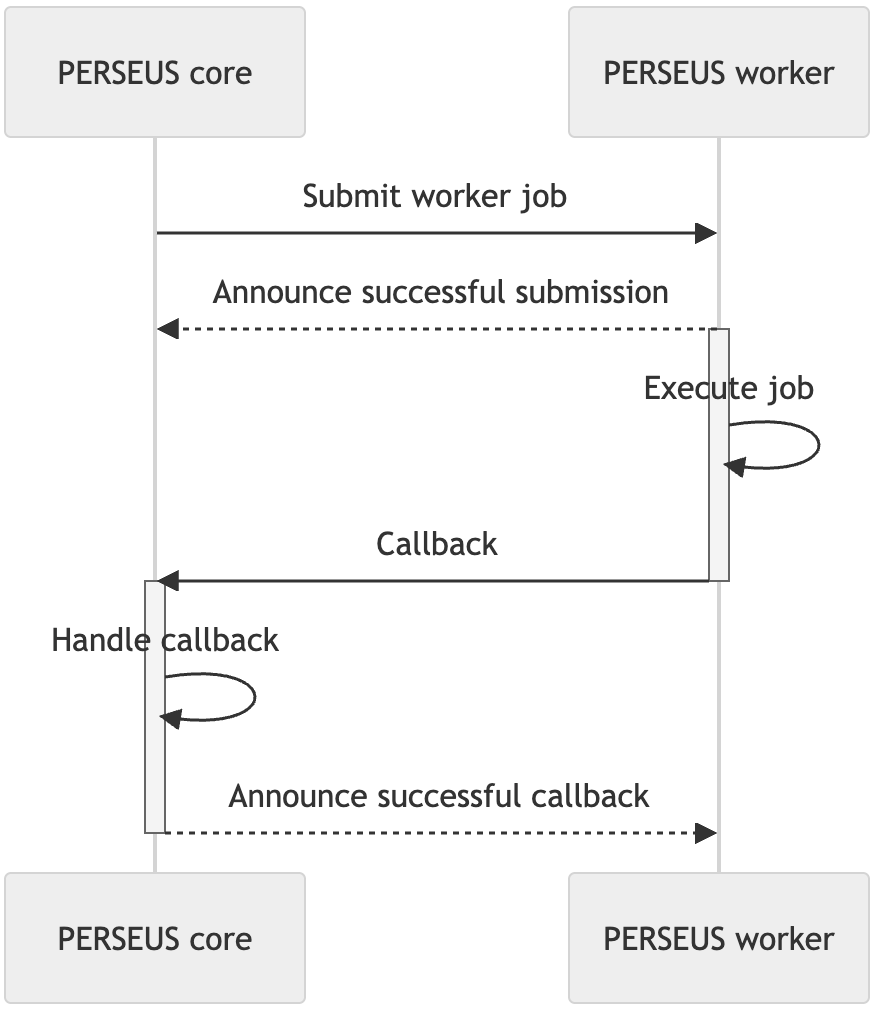
Section titled “Functionality”A PERSEUS core instance can submit jobs to a PERSEUS worker. Please note that the logic required for a job has to be added to the worker and is not sent between the components. Basically, PERSEUS core announces that a job has to be done (data can be added). The worker will execute the job and tell PERSEUS core that the job has finished by using a callback given when the job was submitted in the first place.
Run worker
Section titled “Run worker”To run the PERSEUS worker follow these steps:
- Install python (tested on python 3.12)
- Install all the requirements from the requirements.txt
- Add PERSEUS instance to whitelist
- Add the worker’s logic
- Run from the main directory:
fastapi run main.pyFor more information on running the webserver take a look at the fastapi documentation.
Add PERSEUS instance to whitelist
Section titled “Add PERSEUS instance to whitelist”To allow a certain PERSEUS instance to submit jobs to the worker, you must add it to the whitelist.
To do so, create a file whitelist.txt and add the URL of the PERSEUS core instance (one per line).
Please be reminded to add the complete URL to the core instance, i.e. https://core.perseus.my-institution.com/api.
Add worker logic
Section titled “Add worker logic”To allow the worker to actually work on jobs, you can add so-called handlers. You can add as many handlers as you like. Each handler should accept only one type of jobs.
To add a handler, you can either use an already existing handler from the publicly available plugins or create a new one.
Add already existing handler
Section titled “Add already existing handler”Let’s say you have a new worker and downloaded a handler called ExecuteSlurmMagic.py.
You only need to move the file to the handlers directory. Your file structure should look like this:
Directoryhandlers
- __init__.py
- BaseHandler.py
- EchoHandler.py
- ExecuteSlurmMagic.py
Done! Your handler is now ready to use.
Create a new handler
Section titled “Create a new handler”Let’s say we want to implement a handler called MyAwesomeHandler.
First, we would need to create the file handlers/MyAwesomeHandler.py.
Then, we need to create a new class called MyAwesomeHandler which inherits from BaseHandler,
add an attribute path and implement the asynchronous classmethod handle_request:
from typing import Anyfrom .BaseHandler import BaseHandler

class MyAwesomeHandler(BaseHandler):    path: str = "my-path"
    @classmethod    async def handle_request(cls, payload: dict[str, Any]) -> dict[str, Any]:        ...
The path attribute defines to which path the handler should listen to when a new job will be submitted.
A handler can only listen to one path.
Add your handler’s logic to the handle_request method.
The parameter payload is the payload given by PERSEUS core when submitting a job.
This can be used to transfer data that is necessary to execute the job.
Submit job to worker
Section titled “Submit job to worker”In your custom state or service within PERSEUS core, import the following:
from perseus.utils import submit_worker_jobThen, call it like this:
job_id = submit_worker_job( worker_url="https://my.perseus.worker/path", # where to access the worker payload={"my": "data"}, # any data you want to submit with the job, has to be dict callback_url="https://core.perseus.my-institution.com/api/service/MyService/callback" # what URL the worker should request as callback, usually a service request_timeout=10, # Connection timeout in seconds for the initial POST request to `worker_url`. Specifies how long to wait for the worker endpoint to respond before failing. Defaults to 5. worker_timeout=600, # Maximum execution time in seconds for the worker to complete the submitted task. Defines how long to wait for the worker to finish processing after the job has beed successfully submitted. Defaults to 3600.) # returns either the assigned job_id (str) or None in case there was an error