Skip to content

System Status management

Restricted functionality

This functionality can only be accessed when having one of the following roles:
  • OWNER

The System Status module lets admins add or remove system status messages from time to time. This feature provides the editing interface for managing:

  • System status entries such as incidents, warnings, informational notices, and running activities.
  • System status services that represent the systems or service areas affected by those entries.
Overview System Status

The feature is organized into two main working areas:

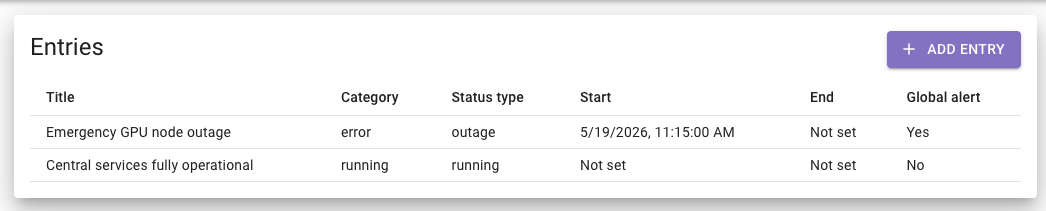
  • Entries — status messages such as incidents, warnings, maintenance notices, informational updates, or running activities.
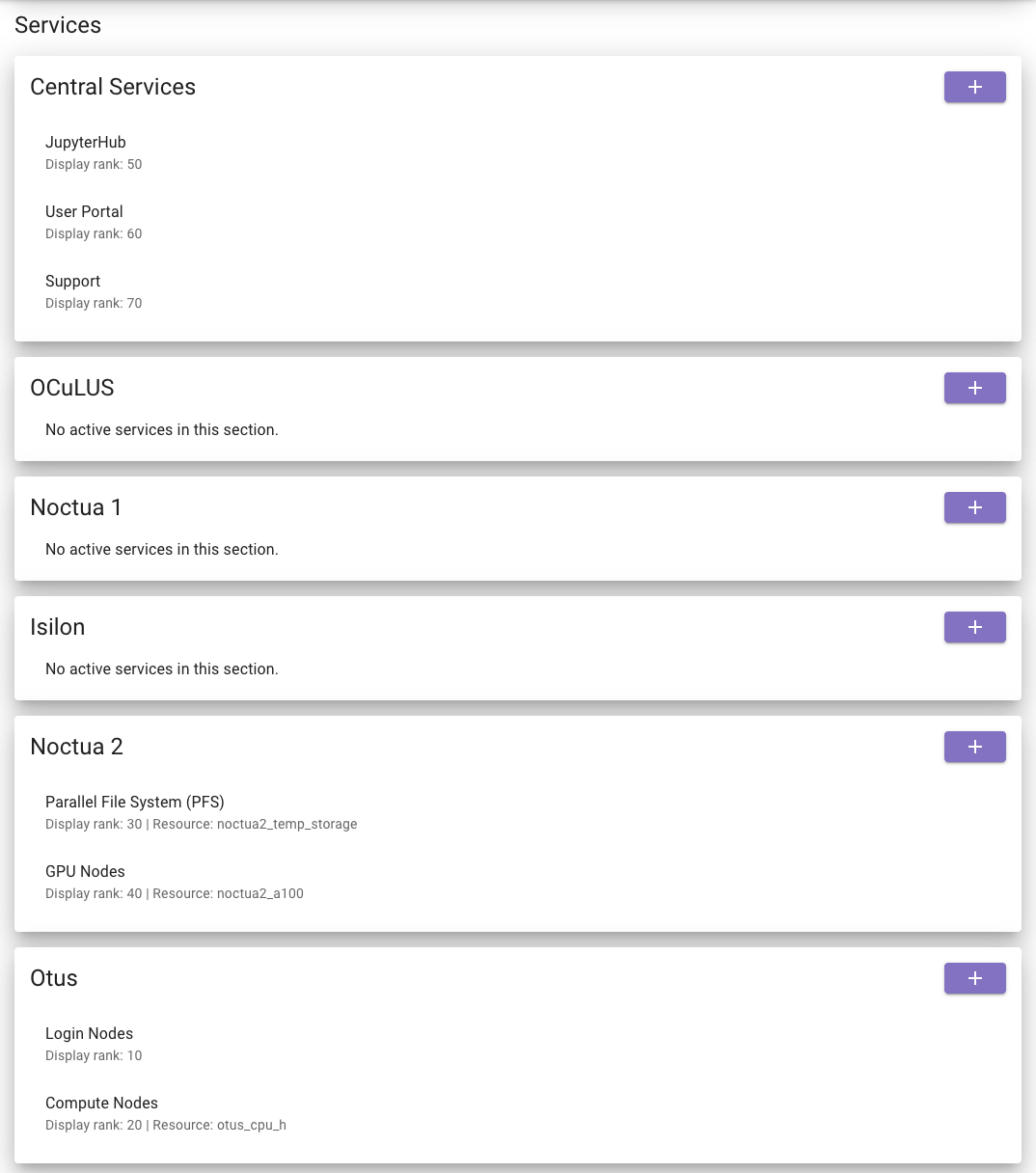
  • Services — the list of services that entries can be attached to.

An entry is the message users create to describe what is happening.

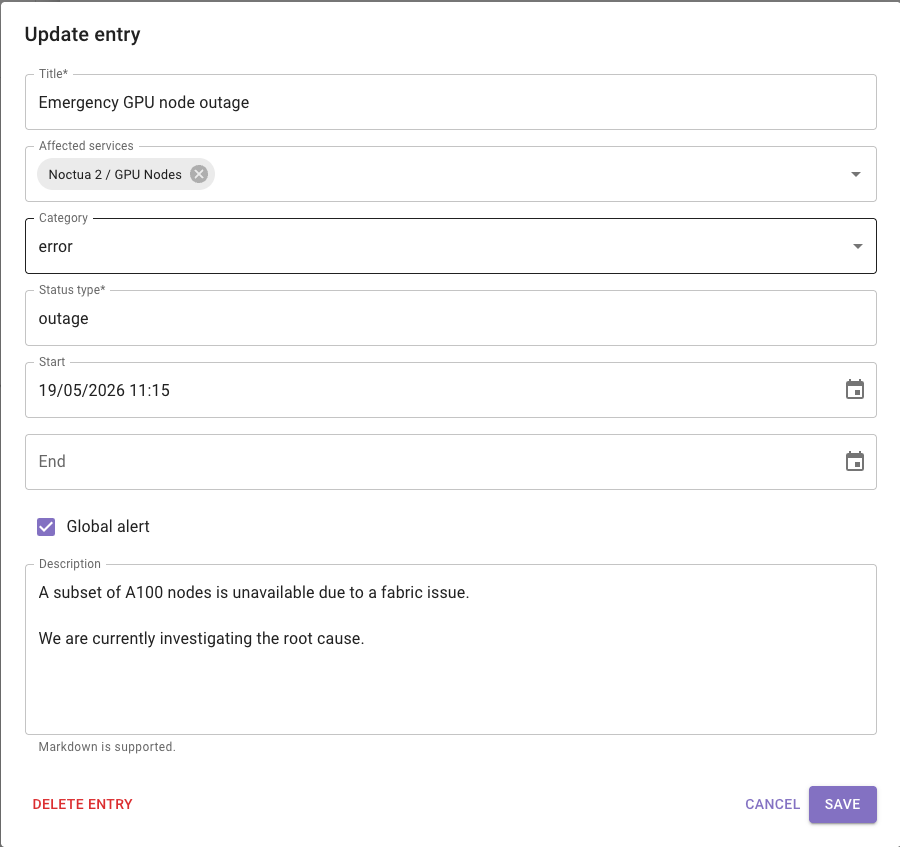
Each entry can contain:

  • A Title
  • One or more Affected services
  • A Category
  • A Status type
  • Optional Start and End date/time
  • A Global alert flag
  • A detailed Description
Entry Table Add Entry form
  1. Click Add entry.
  2. Fill in the message details.
  3. Select the affected services if needed.
  4. Set the category and time window.
  5. Save the entry.
  1. Click an existing row in the entries list.
  2. Change the required details.
  3. Save the changes.
  1. Open an existing entry.
  2. Click Delete entry.
  3. Confirm the action.

Deletion is mainly intended for correcting mistakes or removing entries that should not exist, rather than for normal day-to-day status lifecycle management.

  1. Title: the short headline of the status message.
  2. Affected services: which services are related to the issue or notice.
  3. Category: the severity or type of message. The available categories are error, warning, info, and running.
  4. Status type: a short label such as incident, maintenance, deployment, or performance.
  5. Start / End: the active time window for the message.
  6. Global alert: marks the entry as broadly important.
  7. Description: the full message body. This supports Markdown, so the user can format details clearly.

A service is an item that can receive status entries.

Services are grouped into:

  • Central Services
  • Cluster-specific sections

This makes it easier to organize status management according to the platform layout.

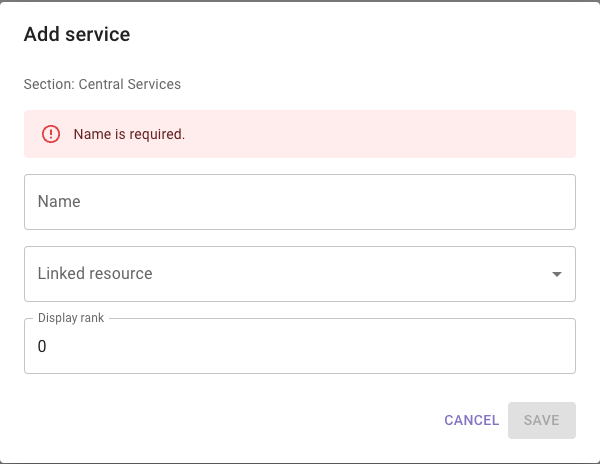
Services section Add Service form
  1. Go to the appropriate section.
  2. Click the Add button in that section.
  3. Enter the service details.
  4. Save the service.
  1. Click the service in the list.
  2. Edit its details.
  3. Save the changes.
  1. Open the service.
  2. Click Mark inactive.
  3. Confirm the action.

Marking a service inactive removes it from the active working list. This is the standard way to retire outdated or unused services.

  1. Name: The service label users will recognize.
  2. Linked resource: An optional connection to a known platform resource.
  3. Display rank: Controls the order of services inside a section. Lower numbers appear first.

Entries are presented so the most important items appear first. In practice, higher-severity items such as error appear before warning, then info, then running. Services are displayed according to their Display rank, which allows admins to keep the most important or most commonly used services near the top.

Typical use cases include:

  • Creating an error entry for an outage affecting one or more services
  • Publishing a warning for degraded performance
  • Posting an informational message for a planned maintenance window
  • Using running to indicate an ongoing operational process
  • Adding newly introduced services so future entries can be assigned to them
  • Retiring outdated services by marking them inactive

Users may encounter the following validation or error situations.

  • Data could not be loaded. The page may display an error if system status data cannot be retrieved. In this case, the user can use Retry.

  • Required entry fields missing. An entry cannot be saved without a Title and a Status type

  • Invalid entry date range. If both Start and End are set, the Start time must be earlier than the End time.

  • Required service fields missing. A service cannot be saved without a Name.

  • Invalid display rank. The Display rank must be a valid whole number.

  • Save or update failure. If the system rejects a create or update action, the user sees an error message in the dialog and can correct the input and retry the operation.

  • Delete failure. If entry deletion fails, the returned error message is displayed to the user.

  • Deactivate failure. If marking a service inactive fails, the returned error message is displayed to the user.